

Automate blog “hugo + obsidian”
Oke, tulisan selanjut nya gue kepikiran gimana cara nya agar nulis blog nya enak, karna blog nya ini pake extention .md untuk artikel, akhirnya kepikiran pake obsidian buat tool nulis nya sebagai markdown generator nya biar nulis nya enak ajah. Akhir nya kepikiran lagi buat bisa ga yah proses nulis sampai deploy nya di buat otomatis? setelah baca2 forum Hugo ternyata banyak bgt yang bikin integrasi Obsidian ke Hugo, karna zaman udah canggih yaah udah kita bikin automated nya bermodalkan chat GPT. Ini gue share gimana cara nya gue bikin integrasi nya.
Jadi ide nya tuh kurang lebih kayak gini
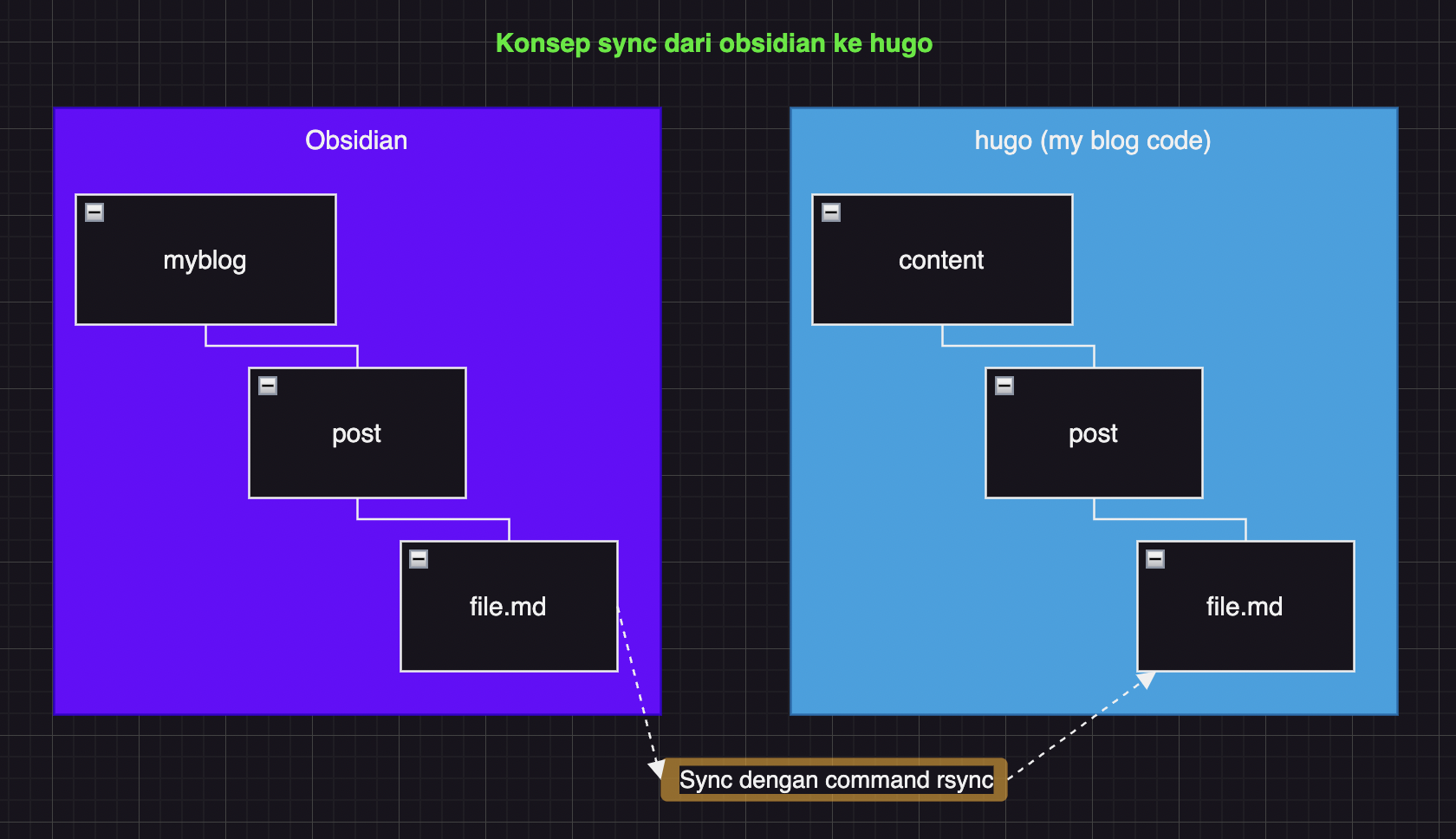
rsync -av --delete ~/Documents/Raharjo/myblog/post/ ~/Documents/GitHub/myporto/content/post/
step selanjut nya gimana cara nya buat copy image di folder local kita bisa ke copy ke folder hugo sebelum di build dan akhir nya di push ke hosting? nah ini lumayan PR, jadi sebenernya konsep nya sama ajah seperti sebelum nya cuma beda nya kita harus read dulu semua file .md ada image apa ajah, trus kita cari nama image nya file .md kita ubah nama di file image “spasi jadi ascii char” , copy image ke folder hugo. buat lengkap nya gue kasih script nya
import os
import re
import shutil
# Paths
posts_dir = "/Users/budimanrahardjo/Documents/GitHub/myporto/content/post/"
attachments_dir = "/Users/budimanrahardjo/Documents/Raharjo/images/"
static_images_dir = "/Users/budimanrahardjo/Documents/GitHub/myporto/static/images/"
# Step 1: Process each markdown file in the posts directory
for filename in os.listdir(posts_dir):
if filename.endswith(".md"):
filepath = os.path.join(posts_dir, filename)
with open(filepath, "r") as file:
content = file.read()
# Step 2: Find all image links in the format 
images = re.findall(r'\[\[([^]]+\.png)\]\]', content)
# Step 3: Replace image links and ensure URLs are correctly formatted
for image in images:
# Prepare the Markdown-compatible link
markdown_image = f"})"
content = content.replace(f"[[{image}]]", markdown_image)
# Step 4: Copy the image to the Hugo static/images directory if it exists
image_source = os.path.join(attachments_dir, image)
if os.path.exists(image_source):
shutil.copy(image_source, os.path.join(static_images_dir, image))
print(f"Copied {image} to {static_images_dir}") # Debug statement
else:
print(f"Image source {image_source} does not exist.") # Debug statement
# Step 5: Clean up excessive ! marks
content = re.sub(r'\!{2,}', '!', content)
# Step 6: Write the updated content back to the markdown file
with open(filepath, "w") as file:
file.write(content)
print("Markdown files processed and images copied successfully.")
dengan begitu image nya bisa ke render di hugo.
Okeh Step final nya gimana cara biar kita bisa execute sequential dari sync file, jalanin code python buat copy semua image local ke dalam hugo sampai bisa ke deploy yaitu dengan cara simple bikin alias di .bashrc/.zshrc, kalo punya gue kaya gini alias nya
alias deploy="rsync -av --delete ~/Documents/Raharjo/myblog/post/ ~/Documents/GitHub/myporto/content/post/ && python3 ~/Documents/GitHub/myporto/new.py && cd ~/Documents/GitHub/myporto && hugo && git add . && echo -n 'Enter commit message: ' && read msg && if [ -z \"\$msg\" ]; then echo 'Commit aborted: empty commit message'; else git commit -m \"\$msg\" && git push; fi"
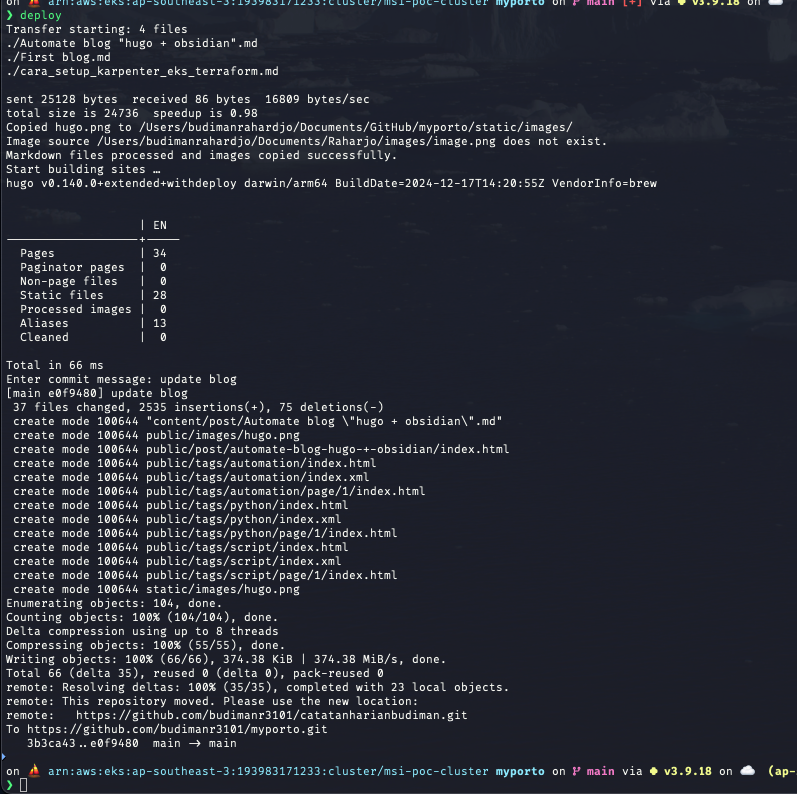
nah jadi kayak gitu deh, jadi sekarang kalo mau update tulisan di blog tinggal 1 command doang “deploy” dia bakal automated proses sampai di deploy ke hosting.
jadi hasil nya nanti kayak gini
thanks 🚀